U.S. Passport Photo Rules: Complete Guide To Compliant Photos
Master the exact specifications for U.S. passport photos to ensure your application sails through without delays or rejections.
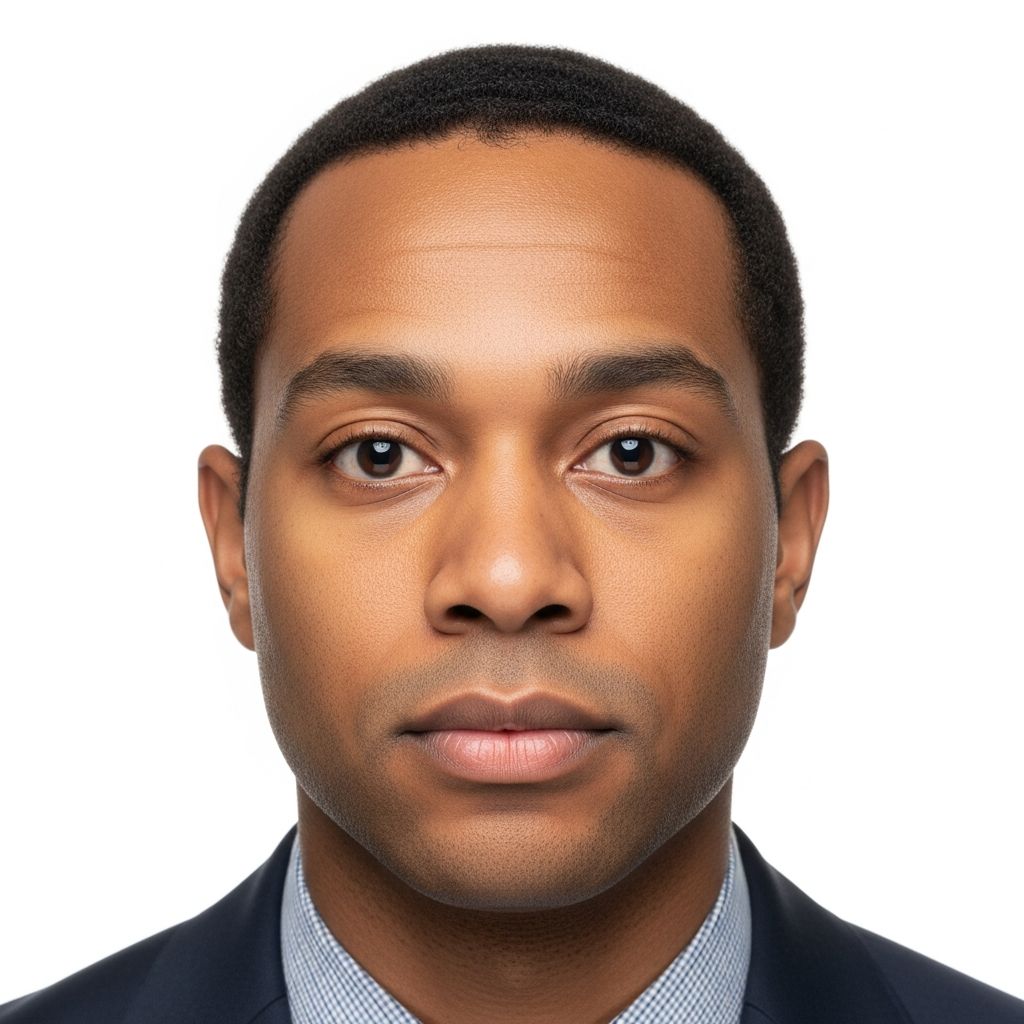
Securing a U.S. passport begins with a seemingly simple step: providing the correct photo. Yet, countless applications face delays or outright rejection due to minor discrepancies in image specifications. Official guidelines from the U.S. Department of State dictate strict standards to ensure photos serve as reliable identifiers for international travel. This guide breaks down every requirement, from dimensions and background to attire and digital uploads, drawing directly from authoritative sources to help you succeed on the first try.
Why Passport Photos Matter So Much
Passport photographs are not mere formalities; they are critical for biometric verification and machine-readable travel documents. International standards set by the International Civil Aviation Organization (ICAO) mandate full-face images that clearly identify the bearer, a rule the U.S. strictly enforces. Non-compliant photos can halt processing, as acceptance rests at the discretion of passport agencies. Using professional services is recommended to meet these exacting criteria.
Recent photos—taken within the last six months—must resemble your current appearance, accounting for changes in hairstyle or facial hair only if they still provide a good likeness. Digital alterations, filters, or AI enhancements are prohibited, preserving authenticity.
Essential Physical Specifications
The cornerstone of compliance is precise sizing and quality. Here’s what every photo must achieve:
- Size: Exactly 2 x 2 inches (51 x 51 mm). Head height from chin bottom to head top must measure 1 to 1 3/8 inches (25-35 mm), occupying 50-69% of the image height.
- Color and Quality: Full color, high-resolution print on photo-quality paper. No blurriness, graininess, or pixelation; focus on head and shoulders.
- Quantity: One identical color photo for standard passport applications.
For digital submissions, such as online renewals or visa forms like DS-160/DS-260, files must be JPEG (preferred), square aspect ratio (600×600 to 1200×1200 pixels), under 240 KB, in sRGB color space.
Background and Lighting Standards
A plain, uniform white or off-white background is non-negotiable, free of shadows, textures, objects, or patterns. Position yourself several feet from the wall—use a white sheet if needed—to avoid shadows. Lighting must be even, illuminating the face clearly without glare or hotspots.
Full-face view directly facing the camera ensures no tilt or angle obscures features. Both eyes must be open, with a neutral expression—no smiling broadly or frowning.
Attire and Appearance Guidelines
| Allowed | Not Allowed |
|---|---|
| Everyday clothing worn daily | Uniforms, camouflage, or uniform-like attire |
| Religious clothing worn daily in public (with statement) | Hats/head coverings obscuring face/hairline (unless religious/medical with docs) |
| Medical head coverings (with doctor’s note) | Eyeglasses, sunglasses, tinted glasses (unless medically necessary with note) |
| Neutral everyday makeup | Headphones, wireless devices |
Clothing should reflect daily wear, avoiding anything resembling a uniform. Head coverings are permitted solely for religious or medical reasons, provided a signed statement confirms daily public use and the full face remains visible without shadows. Glasses are banned to prevent glare or obscured eyes; medical exceptions require a doctor’s note.
No accessories like headphones or hands-free devices. Hair should not obscure the face, and the image must capture head, neck, and upper shoulders.
Special Cases and Exceptions
Certain situations demand additional documentation:
- Infants/Children: Same size rules apply; eyes open, no family in frame. Parent may assist positioning.
- Religious Objections: Full-face photos are mandatory per ICAO; no waivers.
- Immigrant Visas (DS-260): Two identical 2×2 photos at interview, plus digital upload.
- Online Renewal: Upload color photo (54 KB-10 MB, JPG/PNG/HEIC/HEIF) with shoulders in frame.
Scanned existing photos must be 300 DPI; use State Department tools for validation.
How to Take or Get Compliant Photos at Home or Professionally
Professionals guarantee compliance, but DIY is viable with care. Use a plain wall, natural light, and tripod. Apps or State tools validate composition. Avoid selfies, vending machines, or phone snapshots—they rarely meet standards.
Steps for home photos:
- Set up white/off-white background.
- Position 3-5 feet away; center face.
- Camera at eye level; neutral expression.
- Crop to 2×2 with proper head size.
- Print matte on photo paper or upload digitally.
Common Mistakes and How to Avoid Them
Rejections often stem from:
- Wrong size or head proportion.
- Shadows or busy backgrounds.
- Glasses, hats, or smiles.
- Old photos or edits.
- Low resolution or wrong file format.
Double-check against official templates before submitting.
Frequently Asked Questions (FAQs)
Can I smile in my passport photo?
No broad smiles; maintain a neutral expression with closed mouth and open eyes.
What if I wear glasses for medical reasons?
Provide a doctor’s signed note; otherwise, remove them—no glare allowed.
Is a digital photo okay for renewal?
Yes, for online renewal: color, recent, specific file specs.
How recent must the photo be?
Within 6 months for a current likeness.
Can family be in the photo with a baby?
No; subject alone, even for infants.
Visa Photo Differences from Passports
U.S. visa photos mirror passport specs but vary by type. Nonimmigrant (DS-160): digital upload. Immigrant (DS-260): two prints at interview. Same size, background, and pose rules apply universally.
References
- Passport Photos — U.S. Embassy & Consulates in France. 2024. https://fr.usembassy.gov/passports/passport-photos/
- Passport Photo Requirements — U.S. Environmental Protection Agency. Accessed 2026. https://www.epa.gov/lead/are-there-any-special-requirements-passport-photos
- Passport Photos — U.S. Department of State. Accessed 2026. https://travel.state.gov/content/travel/en/passports/how-apply/photos.html
- Photo Requirements — U.S. Department of State. Accessed 2026. https://travel.state.gov/content/travel/en/us-visas/visa-information-resources/photos.html
- 8 FAM 402.1 PASSPORT PHOTOGRAPHS — U.S. Department of State Foreign Affairs Manual. 2024-09-06. https://fam.state.gov/fam/08fam/08fam040201.html
- Digital Image Requirements — U.S. Department of State. Accessed 2026. https://travel.state.gov/content/travel/en/us-visas/visa-information-resources/photos/digital-image-requirements.html
Similar Articles






Read full bio of medha deb